beehiiv vs Kit for Newsletter Monetization
beehiiv vs Kit compared for newsletter monetization: free tiers, paid scale pricing, Ad Network vs Sponsor Network, and which model each platform fits.
Linktree vs storefront platforms: three jobs (link hub, sell-own, sell-others), published fees for Linktree, Beacons, and Stan, plus GMV break-even math.

TL;DR: Linktree vs storefront platforms is a job choice, not a brand preference. Link hubs route clicks. Creator storefronts sell your own catalog when monthly GMV clears a flat fee. Selling someone else’s product is a third job that needs affiliate tracking and a co-branded sell page. Pick the tool that finishes the job your bio must do this month.
Creators keep asking which logo wins: Linktree, Stan, Beacons, or “a real storefront.” That question is broken. The stack that wins is the one that matches the job your single bio link has to finish.
If you are weighing linktree vs storefront platforms, you need three things: a clean definition of each tool class, the published fee ladders (not influencer rumor), and a break-even line at fixed monthly sales. Percentage fees look free until you ship. Flat fees look expensive until you sell.
Key takeaways:
Linktree vs storefront platforms is the comparison between a link-in-bio hub that lists destinations and a creator commerce page that is designed to take payment for your offers from that same bio click.
A link hub’s core product is navigation. You put podcast episodes, a newsletter, a booking link, a TikTok, and maybe an Amazon cart into one page so Instagram’s single URL slot stops being a bottleneck. Linktree popularized that pattern. Commerce features can exist on a hub, but they are add-ons to a directory.
A creator storefront’s core product is checkout. Stan Store, Beacons Store, and similar tools treat the bio link as a mini shop: digital downloads, courses, memberships, coaching bookings, lead magnets, and email capture sit on one branded surface. The page is not mainly “here are my twelve URLs.” It is “here is what you can buy or book from me.”
A third category sits beside both, and most comparison posts skip it. Affiliate and co-branded storefronts exist so you can sell someone else’s product with tracking, attribution, and a split. That is closer to how affiliate marketing works than to a link list. feat. is built for that merchant-plus-affiliate loop: list, pitch, approve, then fork a co-branded sell page. It is not trying to replace a multi-link bio as your only homepage.
So the honest comparison is not “which app is cooler.” It is which of three jobs you need: route traffic, sell your catalog, or sell another brand’s catalog.
The choice matters because the fee model and the conversion surface change together. A free link page with a double-digit seller cut can cost more than a paid storefront once you actually sell. A beautiful shop with no product still loses to a plain link that sends a warm buyer to the right checkout.
Why founders and creators feel this decision:
There is no public dataset that proves a universal conversion lift for “in-bio checkout” versus “click out to Shopify” across niches. Treat creator anecdotes as direction, not as a benchmark you can underwrite.
You match the tool to the job, then you price the job with published fees. Job A is a link hub. Job B is a sell-own storefront. Job C is sell-others (affiliate or co-branded). Fee math uses subscription plus seller percentage at fixed monthly GMV; Stripe sits outside the platform comparison because every path pays a processor.
| Job | What success looks like | Tool class that fits | Weak fit |
|---|---|---|---|
| A. Route | Visitor finds the right destination fast | Link hub (Linktree-class) | Heavy storefront with one lonely “links” tab |
| B. Sell own | Visitor buys your digital product, course, membership, or booking | Creator storefront (Stan / Beacons Store-class) | Free hub with 9%-12% seller fees once GMV rises |
| C. Sell others | Visitor buys a merchant’s product attributed to you | Affiliate / co-branded storefront + tracked offer | Plain link list with no attribution or brand kit |
Most ranking pages stop at A versus B. Job C is why creators who promote brand catalogs still feel stuck after they “upgrade to a storefront.” A Stan-style shop is excellent for your course. It is not automatically a marketplace that finds merchants, forks co-branded pages, and settles splits. Linktree Shops can surface commissioned products, but Linktree’s own help notes fees on Partner Earnings for Free/Starter/Pro as a percentage of commission earned until Premium (Linktree Help).
Use help-center fees, not TikTok screenshots.
Linktree (digital products and courses) (Linktree Help, Oct 22, 2025):
| Plan | Linktree fee on digital products | Processor (US example) |
|---|---|---|
| Free | 12% of sale price | Stripe 2.9% + $0.30 |
| Starter / Pro | 9% of sale price | Stripe 2.9% + $0.30 |
| Premium | 0% Linktree fee | Stripe 2.9% + $0.30 |
Linktree’s own $34.99 course example nets about $29.48 on Free, $30.53 on Starter/Pro, and $33.68 on Premium after both fee layers. Subscription stickers for Starter / Pro / Premium are commonly listed near $8 / $15 / $35 monthly and vary by region; confirm on Linktree pricing before you commit.
Beacons (Beacons Help, Nov 14, 2025):
| Plan | Monthly (as stated in fee FAQ) | Beacons seller fee |
|---|---|---|
| Free | $0 | 9% |
| Creator | $10 | 9% |
| Creator Plus | $30 | 0% |
| Creator Max | $90 | 0% |
Stripe at Beacons is listed as 2.9% + $0.30; PayPal as 3.49% + a currency-based fixed fee.
Stan Store (Stan Help, plan comparison):
| Plan | Subscription | Stan platform cut |
|---|---|---|
| Creator | $29/mo or $300/yr | 0% |
| Creator Pro | $99/mo or $948/yr | 0% |
Stan states it has no free storefront plan (affiliate-only accounts are a different product). US Stripe is listed at 2.9% + $0.30 per purchase, with a payout fee of 0.25% + $0.25 (minimum $1).
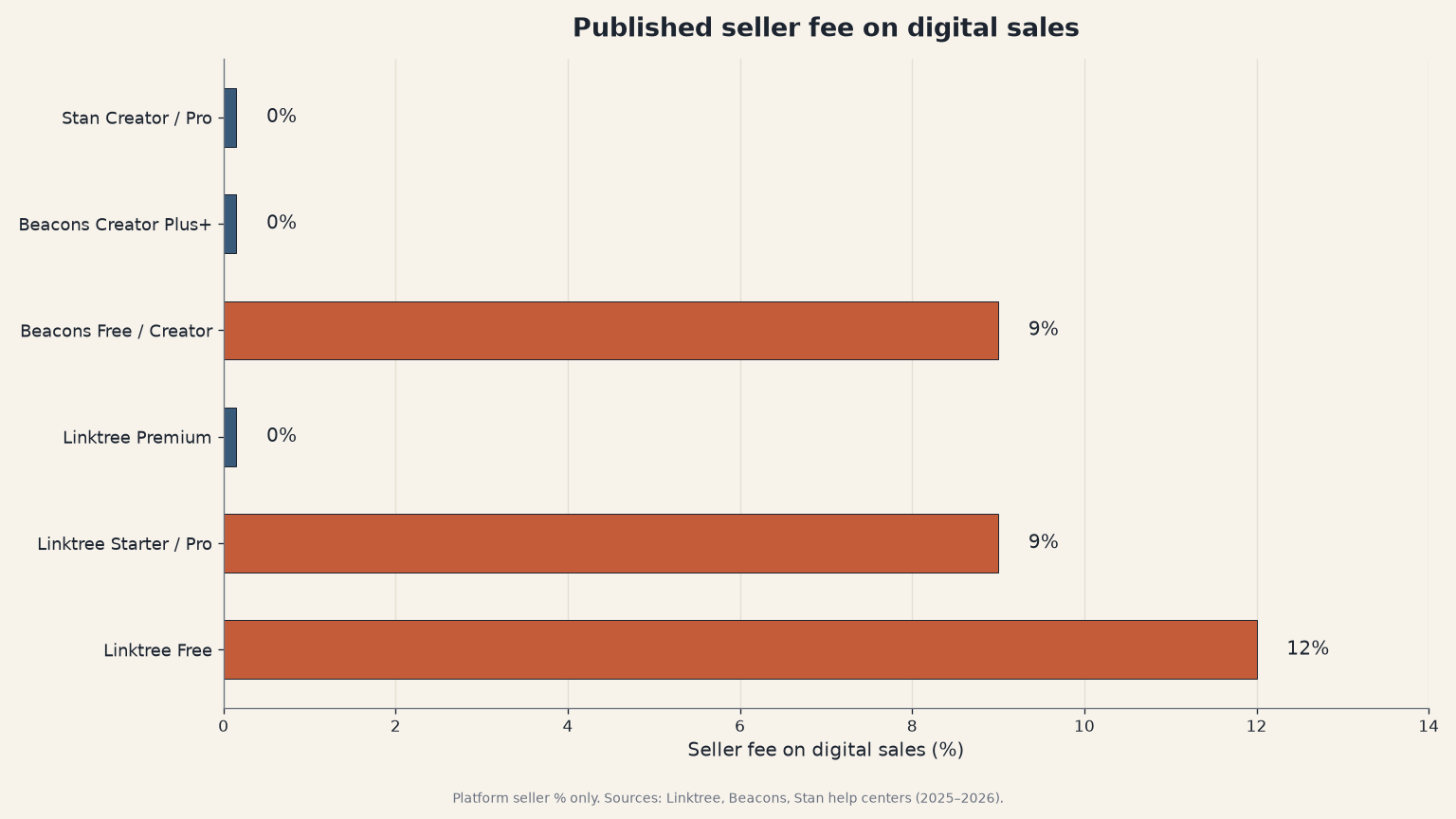
Source: Linktree Help (2025), Beacons Help (2025), Stan Help (2026). https://help.linktr.ee/en/articles/11410206-understanding-transaction-and-processing-fees-on-linktree · https://help.beacons.ai/en/articles/4700289 · https://help.stan.store/article/83-stan-stripes-transaction-fees
Hold processor fees constant and ignore them for a moment. Platform cost ≈ monthly subscription + (seller% × GMV). Using Free / 0%-tier pairs and Stan Creator:
| Setup | Sub | Seller % | Cost at $500 GMV | Cost at $2,000 GMV |
|---|---|---|---|---|
| Linktree Free | $0 | 12% | $60 | $240 |
| Linktree Premium | $35 | 0% | $35 | $35 |
| Beacons Free | $0 | 9% | $45 | $180 |
| Beacons Creator Plus | $30 | 0% | $30 | $30 |
| Stan Creator | $29 | 0% | $29 | $29 |
Approximate break-even lines where the flat 0% plan undercuts the free percentage plan (platform fees only):
These are proposal math from published schedules, not a survey of creator earnings. Re-run them when help centers change. They exist so you stop debating vibes and start debating dollars.
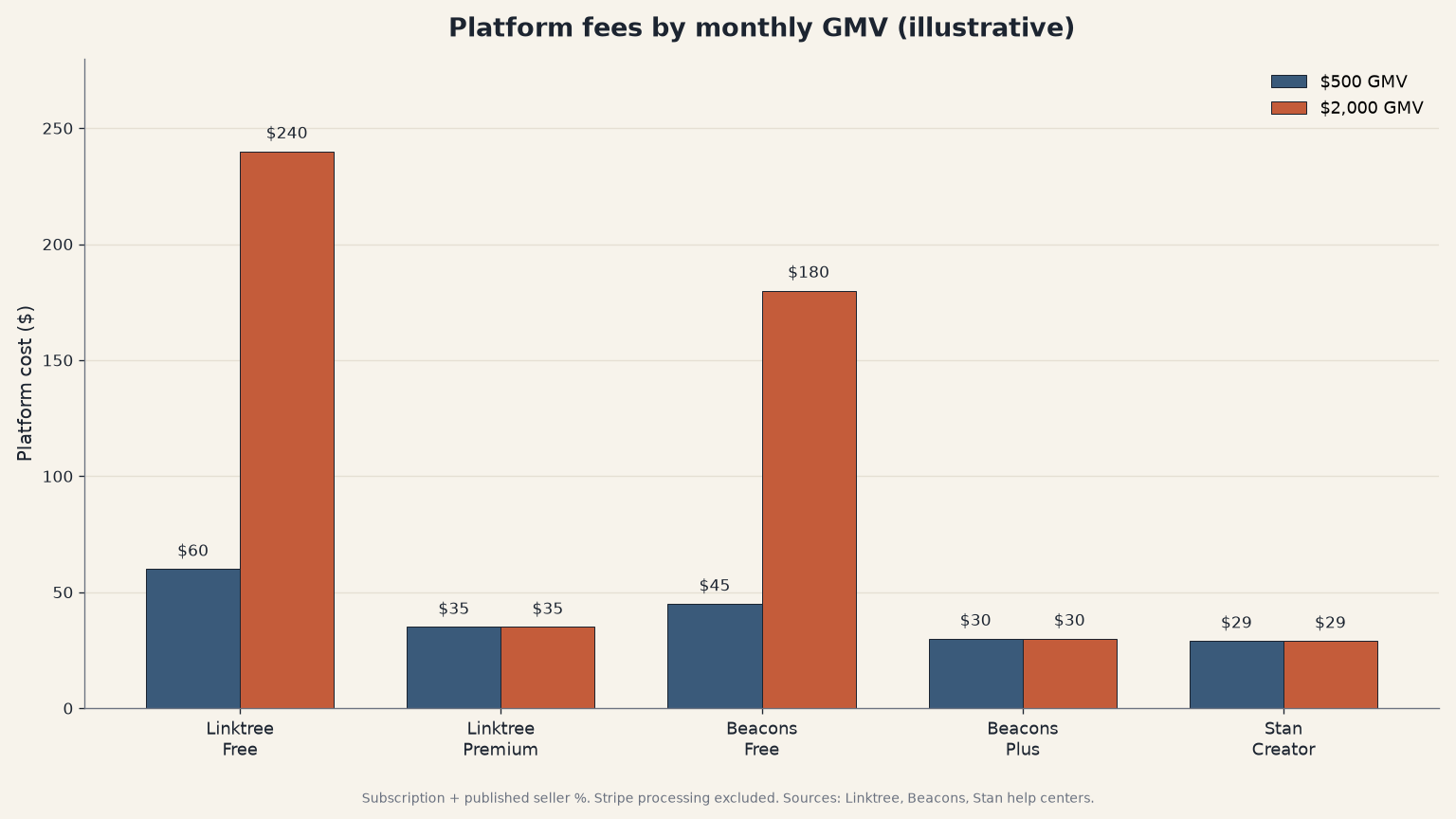
Source: Original analysis from Linktree, Beacons, and Stan help-center fee schedules (2025–2026). Linktree: https://help.linktr.ee/en/articles/11410206-understanding-transaction-and-processing-fees-on-linktree · Beacons: https://help.beacons.ai/en/articles/4700289 · Stan: https://help.stan.store/article/83-stan-stripes-transaction-fees
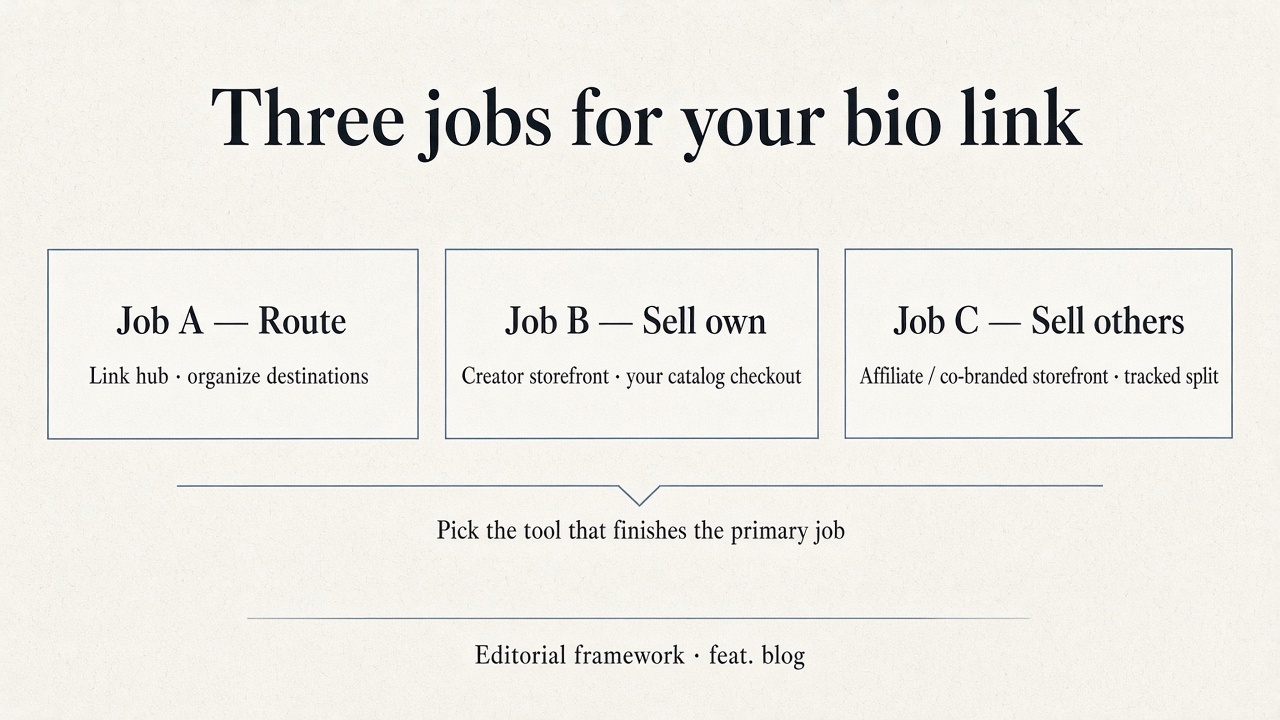
Source: Editorial framework for this article. Product positioning for co-branded affiliate storefronts: feat. FAQ comparisons (Linktree vs feat.).
Link hubs win when:
Creator storefronts win when:
Affiliate / co-branded storefronts win when:
Mixing is normal. Plenty of creators keep a link hub for socials and point one button at a storefront or an affiliate page. The failure mode is forcing one app to fake all three jobs.
Write down the job, estimate next-month GMV, then pick the cheapest stack that can finish the job without inventing features the tool does not have.
Common failure modes to fold in here: upgrading to a storefront with nothing to sell; staying on a free 12% plan after you cross $500 GMV; stuffing twenty affiliate links into a hub and expecting brand-quality conversion; skipping FTC disclosure when compensation is a material connection.
Q: Is Linktree or a storefront better for selling digital products? A: A creator storefront is usually the better primary surface once you sell consistently, because checkout is the product. Linktree can sell digital products, but Free takes 12% and Starter/Pro take 9% until Premium (Linktree Help). Run the GMV break-even before you call either option “cheaper.”
Q: What is the difference between Linktree vs Stan Store? A: Linktree is a link hub with commerce features layered on. Stan Store is a paid creator storefront ($29 or $99/mo) with a 0% platform transaction fee (Stan Help). Choose Linktree when routing wins. Choose Stan when selling your own catalog is the job and your volume clears the flat fee.
Q: Is Beacons better than Linktree for beginners? A: Beacons is often stronger when you want store, email, and media-kit style features early, but Free and the $10 Creator plan still take 9% on sales (Beacons Help). Linktree remains fine as a free router. “Better” depends on whether your next ninety days are about links or about checkout.
Q: How much GMV do I need before Stan beats Linktree Free on fees? A: On platform fees alone, Stan Creator at $29/mo undercuts Linktree Free’s 12% near about $242 in monthly GMV ($29 ÷ 0.12). That is original math from published schedules, not a guarantee of profit, and it ignores Stripe on both sides.
Q: Does a storefront replace affiliate marketing? A: No. A storefront that sells your own products is Job B. Affiliate marketing is Job C: promoting a merchant’s offer for a tracked commission. You still need attribution, disclosure, and a commission design. A link hub or solo shop does not automatically become an affiliate marketplace.
Linktree vs storefront platforms stops being confusing when you stop crowning a winner and start assigning jobs. Route traffic with a hub. Sell your own catalog with a storefront once the fee curve flips. Sell someone else’s catalog with affiliate plumbing and a co-branded page. The published percentages and subscriptions are public; your GMV is the only private input that matters.
If you want products to promote through a tracked, co-branded sell surface, browse the marketplace at https://www.feat.press/marketplace.
beehiiv vs Kit compared for newsletter monetization: free tiers, paid scale pricing, Ad Network vs Sponsor Network, and which model each platform fits.
Storefront vs landing page for selling digital products: Unbounce's 6.6% median LP CVR, Monetate-cited 2x vs stores, and when a multi-SKU shop wins.
A creator storefront is a shoppable page tied to a creator. Four surfaces: link hub, sell-own shop, retailer affiliate page, marketplace co-branded page.